
Key Takeaways
Valify transformed a manual, error-prone data import workflow into a fully automated AWS pipeline. By standardizing data formats, consolidating delivery channels, and orchestrating imports with AWS services, the team achieved faster processing, improved reliability, and scalable infrastructure that supports continued growth. This automation now strengthens the foundation of Valify’s healthcare spend analytics technology and purchased services benchmarking platform.
How Valify Built a Fully Automated AWS Data Import Pipeline to Improve Speed, Scale, and Reliability
The Manual Data Import Process and Its Limitations
The core challenge we set out to solve was removing the manual execution from our data import process to streamline the workflow and enable scale. At the time, an analyst operated directly within a Linux environment, manually triggering scripts and running queries step by step until an import was completed. While this approach functioned in theory, it relied heavily on human intervention and was never designed to scale with the growth of the business.
As Valify expanded, we were consistently using nearly every available day within our SLA just to publish data on time. That limited buffer created downstream bottlenecks, particularly between the data ingestion and categorization teams, and left little room to absorb delays, rework, or unexpected issues.
Compounding the problem, the process relied heavily on manual execution and sequencing, which increased the likelihood of human error. These errors were rarely the result of poor execution, but rather a predictable outcome of a workflow that required too many hands-on steps and too much tribal knowledge.
It became clear that while the process technically worked, it was doing us no favors in the long term. If we wanted to support continued growth, reduce risk, and improve throughput, we needed a more resilient and scalable solution. These challenges are common in legacy data ingestion workflows, where manual scripts, inconsistent file formats, and human-driven sequencing limit throughput and reliability.
Automation Starts with Standardization
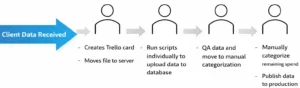
Over time, Valify had accumulated a wide variety of data feeds that reflected client-specific constraints rather than system-wide consistency. Historically, we accepted client data in whatever format it could be delivered, which led to manual preprocessing steps for many feeds. While we provided data specifications, they were not strictly enforced, and exceptions gradually became the norm.
This variability made automation effectively impossible. Before we could automate anything, we needed to eliminate ambiguity within our data ingestion workflows.
Tightening Data Specifications
We began by revisiting and tightening our existing data specifications, making them more explicit and less open to interpretation. These updated standards clearly defined:
- Accepted file formats
- Required data structures
- Mandatory fields
- Rejection criteria for non-compliant feeds
Once those expectations were established, we collaborated with client IT teams, particularly those with the most problematic feeds, to resolve recurring issues and eliminate the need for manual file manipulation.
Consolidating File Transfer Channels
We simultaneously addressed the file transfer process. Data was arriving through multiple channels, including SFTP (our preferred method), ShareFile, and email. Each delivery required an analyst to manually review files and create a Trello card to initiate downstream work.
With multiple intake paths, this introduced unnecessary risk. Missed notifications or overlooked files could result in work never being queued.
To reduce that risk, we worked with clients to consolidate file delivery to SFTP or ShareFile, both of which provide reliable upload notifications. This allowed us to move away from manual monitoring and toward a more deterministic, event-driven intake model.
Laying the Foundation for Automation
Standardizing both the data structure and delivery mechanism laid the foundation for everything that followed. Without that groundwork, automation would have amplified existing inconsistencies rather than eliminating them.
By enforcing consistent schemas and consolidating delivery channels, Valify created a predictable intake layer capable of reliably triggering downstream AWS automation.
Choosing AWS Tools for Data Import Automation
A Simplest Viable Product Mindset
When evaluating tools for automation, we intentionally adopted a “simplest viable product” mindset. Rather than rebuilding or refactoring existing import logic, we focused on eliminating the most manual and error-prone part of the workflow: triggering and orchestrating the import process itself.
Preserving Stable Import Logic
We already had well-tested shell scripts powering our imports. The challenge was not execution, but consistency, ensuring those scripts ran at the right time, in the correct order, and with full visibility. With that in mind, we designed the automation around orchestration rather than reinvention.
Selecting AWS Services for Orchestration
To accomplish this, we implemented a combination of:
- AWS Lambda
- Amazon S3
- Amazon SQS
- Amazon CloudWatch
- AWS Systems Manager Automation
Each service played a role in creating a scalable, event-driven orchestration layer without rewriting the underlying import logic.
Codifying the Manual Workflow
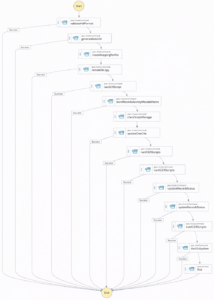
We began by creating a Systems Manager Automation document that explicitly defined each step of the import process. Using JSON, we mapped out the same sequence of scripts and validations an analyst had previously executed manually. In effect, this document became a codified version of the human workflow.
Moving to an Event-Driven Trigger Model
To trigger the automation, we introduced an AWS Lambda function that executes the Systems Manager Automation document whenever a new file is uploaded to a designated S3 bucket. This allowed us to shift from a manual, schedule-driven process to an event-driven model where data availability itself initiates processing.
Automating File Delivery with MOVEit and Amazon S3
Establishing a deterministic file intake foundation for automation
Standardizing Inbound File Transfers
To ensure files reliably reached Amazon S3, we revisited how data was transferred into our environment. As part of this effort, we began migrating direct SFTP feeds to our enterprise file transfer platform, MOVEit. This transition allowed us to standardize inbound transfers and automatically forward uploaded files into our S3 bucket.
By centralizing transfer through MOVEit, we reduced variability at the ingestion layer and created a controlled entry point into our AWS environment.
Creating a Predictable Handoff into the Pipeline
By centralizing file delivery through MOVEit and Amazon S3, we established a clean, predictable handoff into the automation pipeline. Once a file lands in S3, the AWS Lambda trigger initiates the Systems Manager Automation workflow, which processes the data without human intervention.
Centralizing delivery into S3 ensures every file enters the pipeline consistently. This guarantees that Lambda can trigger the import workflow immediately upon file arrival, reinforcing the event-driven architecture and eliminating manual intake dependencies.
Maintaining Visibility with Power Automate and Trello Integration
Moving to an event-driven pipeline required careful balance. While execution became automated, we maintained clear visibility into every file upload and workflow initiation.
Preserving Visibility After Removing Manual Execution
While automation removed the need for manual execution, we were careful not to remove visibility from the process. When a file is uploaded to Amazon S3, an email notification is generated to signal successful receipt.
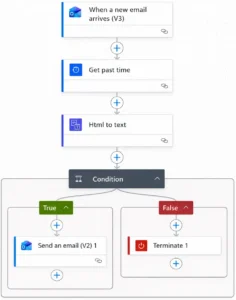
We leveraged Microsoft Power Automate to monitor these notifications. Power Automate monitors incoming email notifications, extracts and parses the relevant metadata, and structures the information required to create a Trello work item.
That structured data is then sent to Trello using its email-to-board functionality. This automatically generates a card on the appropriate board and preserves our existing workflow without manual intervention.
Replicating the Existing Analyst Workflow
This mirrors the same workflow an analyst previously handled manually, but with improved reliability and consistency. Every file upload results in a visible and traceable work item, ensuring downstream teams are notified promptly and no data enters the system silently.
The Outcome
The outcome is a fully automated intake and processing pipeline that maintains human awareness where it matters, while eliminating manual intervention where it does not.
Managing Import Volume with an AWS SQS Automation Queue
As automation increased throughput, we began running imports consistently through the event-driven pipeline. Over time, we observed predictable surges in file volume at certain points in the month.
Identifying Peak Execution Risk
During high-volume periods, multiple imports could be triggered in rapid succession. This created the risk of execution timeouts and resource contention across the system.
Although the automation was functioning correctly, simultaneous processing placed pressure on compute resources and downstream dependencies.
Introducing an SQS-Based Automation Runner
To address this, we introduced an automation runner queue using Amazon SQS. Rather than executing imports immediately upon file arrival, each job is placed into the queue and processed in a controlled, sequential manner.
This queue-based approach allows the system to regulate throughput, maintain stability during high-volume periods, and ensure every import completes successfully without overwhelming downstream resources.
Decoupling Arrival from Execution
By decoupling file arrival from execution, we gained both reliability and flexibility. File uploads still trigger the workflow, but execution is controlled in a predictable sequence.
This approach preserves the event-driven nature of the architecture while improving resilience under peak load conditions.
Embedding QA and Observability into the Automation Pipeline
The final component of the automation workflow was a formalized QA layer. In the original manual process, analysts performed a series of validation checks after each import, including spend validation, date range verification, and confirmation that both PO and non-PO transactions were present where expected. These checks were critical, but they relied entirely on human execution and consistency.
Integrating QA Directly into Automation
To standardize this process, we integrated QA checks directly into the automated workflow and leveraged Amazon CloudWatch for monitoring and alerting. Each import is now evaluated against a consistent set of validation criteria, and the outcome of those checks is logged and observable in real time.
Immediate Failure Handling and Notifications
If an import fails any QA validation or encounters an execution error, the automation halts immediately and a notification is sent to the team. This ensures issues are surfaced early, before downstream processing begins, and that no file progresses through the pipeline without meeting baseline quality standards.
Full Workflow Transparency at Scale
By embedding QA and observability into the automation itself, we achieved full transparency across the workflow and eliminated the risk of missed or inconsistent checks, regardless of volume or timing.
How Automation Elevated Our Team and Improved Scalability
At its core, this effort was about more than automation. It was about changing how we approach data work. By removing manual execution, enforcing standards, and embedding quality directly into the pipeline, we created space for our team to operate as data engineers rather than task-driven analysts.
Leveraging AWS allowed us to build these capabilities incrementally, selecting the right service for each problem while maintaining clarity and control. The result is a system that scales with our data, supports our people, and positions Valify for continued growth.
Automation did not replace expertise. It amplified it. By strengthening our data ingestion foundation, we improved reliability, protected quality, and enabled our team to focus on higher-value engineering and analytics work.
Want to learn more?
Reliable data processing is foundational to accurate analytics and informed decision-making. If you are interested in how Valify’s automated infrastructure supports scalable, consistent data delivery, we would welcome the opportunity to connect.
Contact us at info@GetValify.com or visit Valify to learn more.
Trello Automation Workflow
Overall Automation Workflow
FAQs:
Q: What benefits has Valify seen since implementing automation?
A: The automated pipeline has improved reliability, reduced processing time, increased scalability, and minimized manual intervention. It also strengthened data quality and created more operational capacity for the team.
Q: What benefits do customers receive when their data is processed through Valify’s automated pipeline?
A: Customers receive their data faster and with greater accuracy. Automation reduces manual handling, which lowers the risk of errors and ensures more consistent, reliable results. The end result is quicker turnaround to insights and higher confidence in the data delivered.
Q: What AWS services power Valify’s automation pipeline?
A: AWS Lambda, S3, SQS, Systems Manager Automation, and CloudWatch.

I am a Business Intelligence leader with a strong background in data automation, system engineering, and analytics strategy. I specialize in building and optimizing data systems that transform complex datasets into actionable insights to support strategic decision-making.
